
Meetings
A Client Says It Was Approved. It Was Not. Say This
Published October 26, 2026
 A Client Says It Was Approved. It Was Not. Say ThisWatch on YouTube, 0:58Oct 26, 2026VideoScriptPractice sheet
Know Exactly What to Say
The full script is below, word for word, for when the meeting ends and the next steps have to be clear. Copy it, change the names and dates, and it is ready to send or say.
Practice It Before the Real Conversation
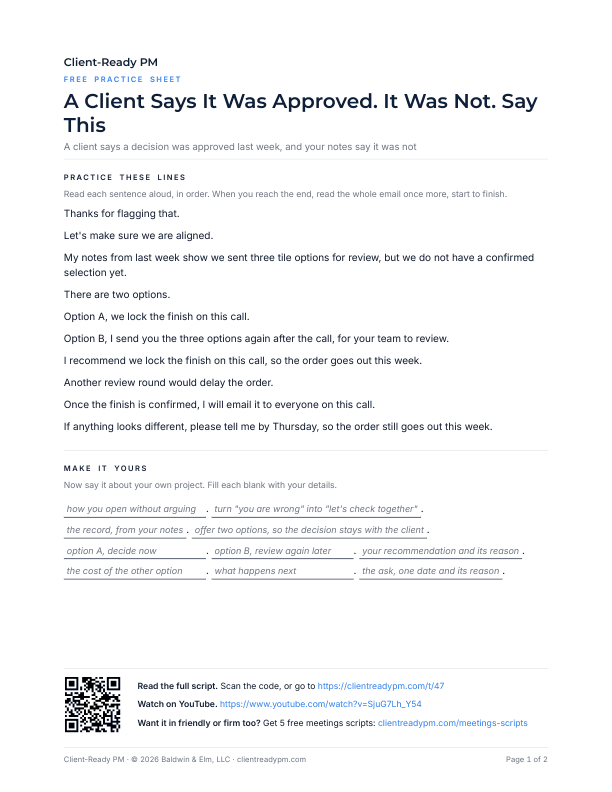
A printable PDF. Say the lines out loud, then fill in your own project's names and dates, so the words are yours before the client is on the line.
Download the practice sheet (PDF)How to Use a Script
Four steps:
- Watch the video once.
- Copy the script. Change the names, dates, and numbers to match your project.
- Say it out loud until it sounds like you. Use the practice sheet if the page has one.
- Use it in the real conversation, in the email or on the call.
The Script
Word for word, as said in the video. Copy it and change the names, dates, and numbers to match your project.
ScriptA Client Says It Was Approved. It Was Not. Say This
You are not correcting the client. You are correcting the record, and giving the client an easy way back to it.
Say this. Thanks for flagging that. Let's make sure we are aligned.
My notes from last week show we sent three tile options for review, but we do not have a confirmed selection yet. There are two options.
- A. We lock the finish on this call.
- B. I send you the three options again after the call, for your team to review.
I recommend we lock the finish on this call, so the order goes out this week. Another review round would delay the order. Once the finish is confirmed, I will email it to everyone on this call.
If anything looks different, please tell me by Thursday, so the order still goes out this week.
More Meetings Videos
 Nobody Replies to Your Meeting Recap? Do Not Write MinutesWatch on YouTube, 0:23Nov 14, 2026
 Client Meeting Stuck? Say These 6 PhrasesWatch on YouTube, 0:30Nov 9, 2026
 Nothing Moved After the Call? Send This Meeting RecapWatch on YouTube, 0:52Nov 1, 2026
 Wrong Fact or Two Answers: Which Message Would You Send?Watch on YouTube, 1:23Oct 24, 2026
 Client Got the Facts Wrong in the Meeting? What to SayWatch on YouTube, 9:35Oct 22, 2026
 What to Say When a Client Says We Already Approved ThatWatch on YouTube, 0:30Oct 20, 2026
 How to Correct a Client in a Meeting Politely: 3 WaysWatch on YouTube, 1:01Oct 19, 2026
 An Inaccurate Statement in the Meeting: The Polite FixWatch on YouTube, 0:40Oct 18, 2026
 Three Messages to a Client Who Will Not Decide: Which Would You Send?Watch on YouTube, 1:14Oct 3, 2026
 Coordination Call Recap: Turn Notes Into Action ItemsWatch on YouTube, 7:38Sep 29, 2026
 Why Your Meeting Summary Email Gets No ReplyWatch on YouTube, 0:56Sep 29, 2026
 Follow-Up Email After No Response: Friendly, Neutral, or FirmWatch on YouTube, 0:58Sep 28, 2026
 Meeting Minutes Email That Gets Every Action ConfirmedWatch on YouTube, 0:40Sep 27, 2026
Free script pack
Get the Free Meetings Script Pack
The next conversation will not sound like this one. The free Meetings pack gives you five more scripts for when the meeting ends and the next steps have to be clear, each in friendly, neutral, and firm versions, so the right words are ready before you need them.
The pack arrives by email in a few minutes. After that, the weekly newsletter.
Your address is used only for the pack and the newsletter. No spam. Unsubscribe anytime.