
Decisions
Client Silent for a Week? Two Options and a Date Get a Yes
Published November 5, 2026
 Client Silent for a Week? Two Options and a Date Get a YesWatch on YouTube, 0:35Nov 5, 2026VideoScriptPractice sheet
Know Exactly What to Say
The full script is below, word for word, for when you need a decision from the client, on the record. Copy it, change the names and dates, and it is ready to send or say.
Practice It Before the Real Conversation
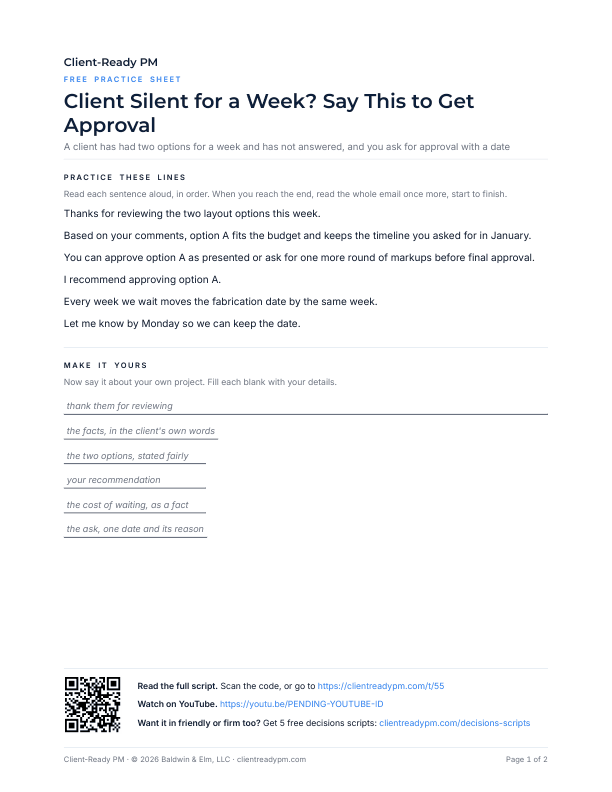
A printable PDF. Say the lines out loud, then fill in your own project's names and dates, so the words are yours before the client is on the line.
Download the practice sheet (PDF)How to Use a Script
Four steps:
- Watch the video once.
- Copy the script. Change the names, dates, and numbers to match your project.
- Say it out loud until it sounds like you. Use the practice sheet if the page has one.
- Use it in the real conversation, in the email or on the call.
The Script
Word for word, as said in the video. Copy it and change the names, dates, and numbers to match your project.
ScriptClient Silent for a Week? Two Options and a Date Get a Yes
Thanks for reviewing the two layout options this week. Based on your comments, option A fits the budget and keeps the timeline you asked for in January. You can approve option A as presented or ask for one more round of markups before final approval.
I recommend approving option A. Every week we wait moves the fabrication date by the same week. Let me know by Monday so we can keep the date.
More Decisions Videos
 Waiting on Client Approval? Do Not Ask for Their ThoughtsWatch on YouTube, 0:23Nov 19, 2026
 Client's Team Can't Agree? 6 Phrases to Get One DecisionWatch on YouTube, 0:33Nov 10, 2026
 When a Client Asks You to Choose for Them, Say ThisWatch on YouTube, 0:35Nov 6, 2026
 Client's Team Sent Two Answers? Send This MessageWatch on YouTube, 0:55Oct 25, 2026
 Wrong Fact or Two Answers: Which Message Would You Send?Watch on YouTube, 1:23Oct 24, 2026
 When a Client's Team Sends Two Different AnswersWatch on YouTube, 10:47Oct 23, 2026
 Show the Client the Disconnect in Their Team's AnswersWatch on YouTube, 0:48Oct 23, 2026
 Two Stakeholders, Two Answers: Friendly, Neutral, or FirmWatch on YouTube, 0:56Oct 22, 2026
 Two Answers, One Order: The Message That Gets a Single YesWatch on YouTube, 0:50Oct 21, 2026
 Three Messages to a Client Who Will Not Decide: Which Would You Send?Watch on YouTube, 1:14Oct 3, 2026
 Design Approval: The Message That Gets a Client to Say YesWatch on YouTube, 7:09Oct 2, 2026
 Approval Request With No Answer: Name the Decision and Give a DateWatch on YouTube, 0:46Oct 2, 2026
 How Firm Should a Late Approval Request Sound? Three VersionsWatch on YouTube, 1:00Oct 1, 2026
 Client Approval Email After a Week With No DecisionWatch on YouTube, 0:33Sep 30, 2026
Free script pack
Get the Free Decisions Script Pack
The next conversation will not sound like this one. The free Decisions pack gives you five more scripts for when you need a decision from the client, on the record, each in friendly, neutral, and firm versions, so the right words are ready before you need them.
The pack arrives by email in a few minutes. After that, the weekly newsletter.
Your address is used only for the pack and the newsletter. No spam. Unsubscribe anytime.