
Pushback
The Message That Ends After-Hours Client Texts
Published October 14, 2026
 The Message That Ends After-Hours Client TextsWatch on YouTube, 0:41Oct 14, 2026VideoScriptPractice sheet
Know Exactly What to Say
The full script is below, word for word, for when a client asks for something you cannot agree to. Copy it, change the names and dates, and it is ready to send or say.
Practice It Before the Real Conversation
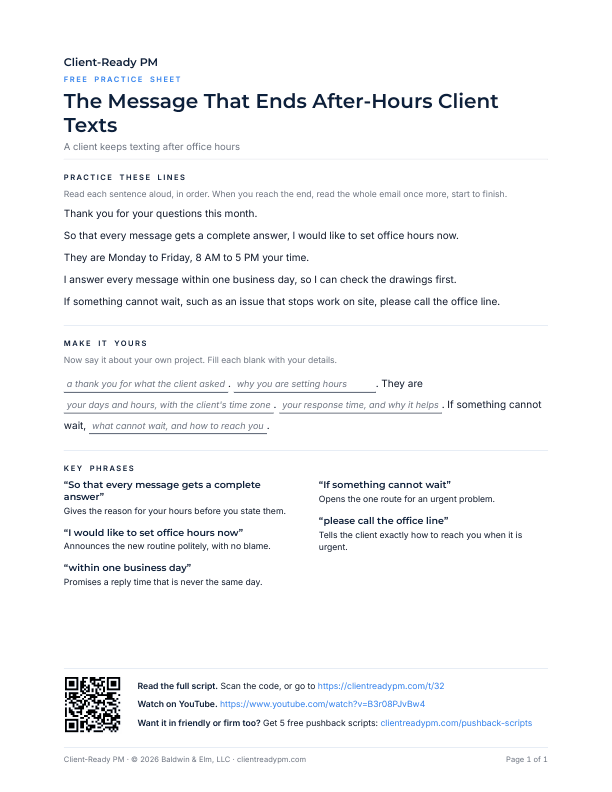
A printable PDF. Say the lines out loud, then fill in your own project's names and dates, so the words are yours before the client is on the line.
Download the practice sheet (PDF)How to Use a Script
Four steps:
- Watch the video once.
- Copy the script. Change the names, dates, and numbers to match your project.
- Say it out loud until it sounds like you. Use the practice sheet if the page has one.
- Use it in the real conversation, in the email or on the call.
The Script
Word for word, as said in the video. Copy it and change the names, dates, and numbers to match your project.
ScriptThe Message That Ends After-Hours Client Texts
Write them down in one email, and send it during the working day. Thank you for your questions this month. So that every message gets a complete answer, I would like to set office hours now.
They are Monday to Friday, 8 AM to 5 PM your time. I answer every message within one business day, so I can check the drawings first. If something cannot wait, such as an issue that stops work on site, please call the office line.
Write the hours down once, and the client never has to guess.
More Pushback Videos
 Saying No to a Client? Do Not Offer Fake OptionsWatch on YouTube, 0:51Nov 16, 2026
 Pushing Back on a Client? Do Not Try to Win the ArgumentWatch on YouTube, 0:20Nov 11, 2026
 Client Moves the Deadline Up? Offer Three OptionsWatch on YouTube, 0:51Nov 3, 2026
 Late-Night Client Texts: Offer Two Options, Recommend OneWatch on YouTube, 0:44Oct 27, 2026
 Difficult Client? Which Email Gets Your Manager's Support?Watch on YouTube, 2:24Oct 17, 2026
 A Client Texted You Last Night: What to Send This MorningWatch on YouTube, 9:28Oct 16, 2026
 The Apology That Keeps a Client Texting After HoursWatch on YouTube, 0:53Oct 16, 2026
 A Client Won't Stop Texting After Hours: Are You Friendly, Neutral, or Firm?Watch on YouTube, 1:30Oct 15, 2026
 Saying No to a Client: The Exact Words That Keep It ProfessionalWatch on YouTube, 12:00Sep 25, 2026
 Pushback on ASAP: The Realistic DeadlineWatch on YouTube, 0:44Sep 25, 2026
 Client Deadline You Cannot Meet: Give Two Options and Recommend OneWatch on YouTube, 0:40Sep 21, 2026
Free script pack
Get the Free Pushback Script Pack
The next conversation will not sound like this one. The free Pushback pack gives you five more scripts for when a client asks for something you cannot agree to, each in friendly, neutral, and firm versions, so the right words are ready before you need them.
The pack arrives by email in a few minutes. After that, the weekly newsletter.
Your address is used only for the pack and the newsletter. No spam. Unsubscribe anytime.